If you bought credits for $20 you cannot use them in the Claude Desktop app, only in the terminal
Tips
Install Claude for Chrome with your paid Claude plan (it doesn't work with the free plan) so Claude can better test the web apps you build with Claude
Click "New" then choose a folder for it to use for that project
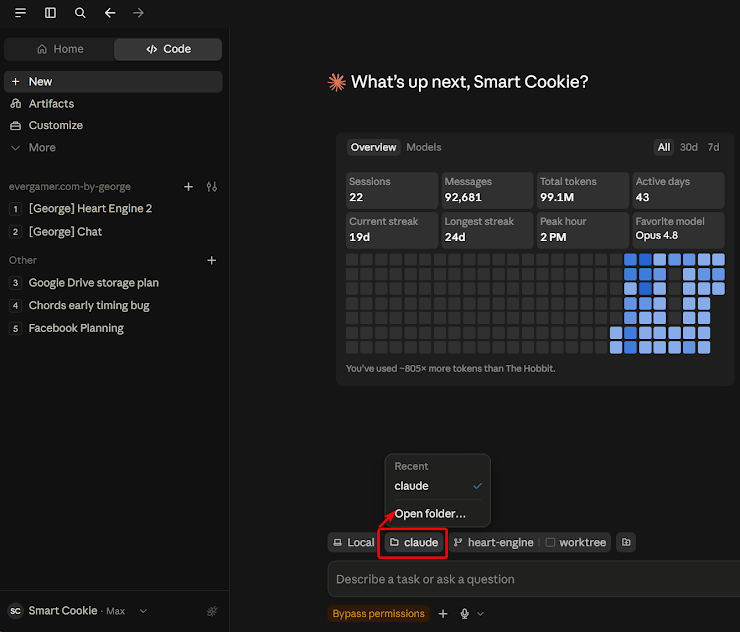
Stop asking "Allow" and auto-accept everything

And
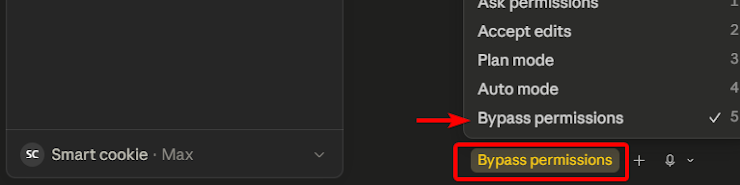
And
~/.claude/settings.json
{
"permissions": {
"allowUnsandboxedCommands": true,
"defaultMode": "bypassPermissions"
},
"sandbox": { "enabled": false },
"theme": "dark",
"skipDangerousModePermissionPrompt": true
}
Install Claude-in-Chrome extension
https://chromewebstore.google.com/detail/claude/fcoeoabgfenejglbffodgkkbkcdhcgfn
Currently requires the Max plan before Claude will use it for debugging your web apps
Install Claude Code terminal on Windows
Claude Code now runs natively on Windows without WSL (Windows Subsystem for Linux)
Open Windows Powershell and type
winget install Anthropic.ClaudeCode
Desktop app
Download from claude.com/download
In April 2026, Anthropic released this fully redesigned Claude Code desktop application for Windows
But it cannot use the credits purchased at platform.claude.com (I know, doesn't make sense, but it's true)
Why can't I use credits in desktop app?
The Claude Code Desktop App does not support API key login. Claude Desktop uses OAuth exclusively and does not read API key environment variables. Claude
So to use your $20 Console credits, you have two paths:
Path 1: Claude Code CLI (uses your API key ✅)
This is the terminal version and does support API key auth. After installing via winget install Anthropic.ClaudeCode, open PowerShell, navigate to your project folder, and run:
powershell
claude
When prompted for login method, select "Anthropic Console" — this opens a browser OAuth flow that connects to your Console account where your $20 credits live. Alternatively, you can set your API key as an environment variable to skip the interactive flow: Developer Toolkit
powershell
$env:ANTHROPIC_API_KEY="sk-ant-your-key-here"
claude
When you first log in via Console, Claude Code automatically creates a "Claude Code" workspace for centralized cost tracking. Developer Toolkit
Path 2: Desktop App (requires a paid subscription ❌ for API credits)
The simplest path with the Desktop App is if you have a Claude Pro or Max subscription — you log in with your claude.ai account and a browser tab opens to authorize it. But this uses subscription limits, not Console API credits.