Useful tips!
Also see best-in-class tools at h.ki/best-in-class
AI
Webdev: Claudecode with Max plan $100 / month code.claude.com/docs/en/overview
Tech stack: Node Vite React
Web hosting: Vercel vercel.com
Reason: ChatGPT chatgpt.com
Latest info (like news): Gemini gemini.google.com
Images: Gemini gemini.google.com
Writing: Claude claude.ai
Email: Resend resend.com
Search: Perplexity perplexity.ai
Save Windows 11 Wallpaper Spotlight images
Step 1: Open in WIndows explorer %USERPROFILE%\AppData\Local\Packages\Microsoft.Windows.ContentDeliveryManager_cw5n1h2txyewy\LocalState\Assets
Step 2: Copy all files to a new folder
Step 3: Run "cmd" to open a command prompt and type "cd [new folder]"\
You can copy the new folder from WIndows Explorer and Ctrl+V (paste) into the command prompt after typing "cd ".
Step 4: Type: ren * *.jpg
Step 5: Back in Windows Explorer, look at the images and save your favorites to your Heartbeat Photos gallery at h.ki/photos by drag-and-drop.
For example, see George's favorites:
- h.ki/im79bl7jr Beautiful scenes 1
- h.ki/imsxk9j5d Beautiful scenes 2
- h.ki/imfdfot78 Bautiful scenes thin
Source pureinfotech.com/download-spotlight-collection-desktop-images-windows-11
How to instantly create unique emails
You can create unique emails without creating new Google accounts.
Simply add "+something" to youremail@gmail.com before the @ to create unique emails that get sent your main email.
For example: youremail+facebook@gmail.com
Emails get sent to youremail@gmail.com with the "facebook" tag added in Gmail making it easy to find all emails sent to youremail+facebook@gmail.com
Use this technique to create new email addresses without creating new Google accounts, useful for free trial sites!
Selective email forwarding
Instead of giving people access to your email, gmail lets you create filters that forward specific emails to other people.
This is useful for businesses where only your accountant needs emails from the tax authority and only your engineer needs emails from the municipality, like OTP codes when signing in.
Microsoft Windows
0:00 Windows+V is paste history - Ctrl+V is latest paste
Windows+V lets you choose what to paste from your previous copied items
Ctrl+Shift+V - Paste as plain text
Ctrl+V - Paste
Windows+L - Instantly lock your PC
Windows+Ctrl+▶ - Next desktop
Windows+Ctrl+◀ - Previous desktop
Shift+F10 - Open context menu (same as right-click)
Ctrl+Alt+Delete
- Lock your PC
- Switch user
- Sign out
- Change your password
- Task Manager
Start > Manage disks and volumes > Mount or unmount hard drives
CTRL+A. . . . . . . . . . . . . . . . . Select All CTRL+C. . . . . . . . . . . . . . . . . Copy
CTRL+X. . . . . . . . . . . . . . . . . Cut
CTRL+V. . . . . . . . . . . . . . . . . Paste
CTRL+Z. . . . . . . . . . . . . . . . . Undo
CTRL+B. . . . . . . . . . . . . . . . . Bold
CTRL+U. . . . . . . …. . . . . . . . Underline
CTRL+I . . . . . . . . . . . . . . . . . Italic
F1 . . . . . . . . . . . . . . . . . . . . . . Help
F2 . . . . . . . . . . . . . . . . . . . . . Rename selected object
F3 . . . . . . . . . . . . . . . . . . . . . Find all files
F4 . . . . . . . . . . . . . . . . . . . . . Opens file list drop-down in dialogs
F5 . . . . . . . . . . . . . . . . . . . . . Refresh current window
F6 . . . . . . . . . . . . . . . . . . . . . Shifts focus in Windows Explorer
F10 . . . . . . . . . . . . . . . . . . . . Activates menu bar options
ALT+TAB . . . . . . . . . . . . . . . . Cycles between open applications
ALT+F4 . . . . . . . . . . . . . . . . . Quit program, close current window
ALT+F6 . . . . . . . . . . . . . . . . . Switch between current program windows
ALT+ENTER. . . . . . . . . . . . . . Opens properties dialog
ALT+SPACE . . . . . . . . . . . . . . System menu for current window
ALT+¢ . . . . . . . . . . . . . . . . . . opens drop-down lists in dialog boxes
BACKSPACE . . . . . . . . . . . . . Switch to parent folder
CTRL+ESC . . . . . . . . . . . . . . Opens Start menu
CTRL+ALT+DEL . . . . . . . . . . Opens task manager, reboots the computer
CTRL+TAB . . . . . . . . . . . . . . Move through property tabs
CTRL+SHIFT+DRAG . . . . . . . Create shortcut (also right-click, drag)
CTRL+DRAG . . . . . . . . . . . . . Copy File
ESC . . . . . . . . . . . . . . . . . . . Cancel last function
SHIFT . . . . . . . . . . . . . . . . . . Press/hold SHIFT, insert CD-ROM to bypass auto-play
SHIFT+DRAG . . . . . . . . . . . . Move file
SHIFT+DELETE . . . . . . . . . . . Full wipe delete (bypasses Recycle Bin)
ALT+underlined letter . . . . Opens the corresponding menu
PC keyboard shortcuts - Document cursor controls
HOME . . . . . . . . . . . . . . to beginning of line or far left of field or screen
END . . . . . . . . . . . . . . . . to end of line, or far right of field or screen
CTRL+HOME . . . . . . . . to the top
CTRL+END . . . . . . . . . . to the bottom
PAGE UP . . . . . . . . . . . . moves document or dialog box up one page
PAGE DOWN . . . . . . . . moves document or dialog down one page
ARROW KEYS . . . . . . . move focus in documents, dialogs, etc.
CTRL+ > . . . . . . . . . . . . next word
CTRL+SHIFT+ > . . . . . . selects word
Windows Explorer tree controls
Numeric Keypad * . . . Expand all under current selection
Numeric Keypad + . . . Expands current selection
Numeric Keypad – . . . Collapses current selection
¦ . . . . . . . . . . . . . . . . . . . Expand current selection or go to first child
‰ . . . . . . . . . . . . . . . . . . Collapse current selection or go to parent
Special characters
‘ Opening single quote . . . alt 0145
’ Closing single quote . . . . alt 0146
“ Opening double quote . . . alt 0147
“ Closing double quote. . . . alt 0148
– En dash. . . . . . . . . . . . . . . alt 0150
— Em dash . . . . . . . . . . . . . . alt 0151
… Ellipsis. . . . . . . . . . . . . . . . alt 0133
• Bullet . . . . . . . . . . . . . . . . alt 0149
• ®️ Registration Mark . . . . . . . alt 0174
• ©️ Copyright . . . . . . . . . . . . . alt 0169
• ™️ Trademark . . . . . . . . . . . . alt 0153
• ° Degree symbol. . . . . . . . . alt 0176
• ¢ Cent sign . . . . . . . . . . . . . alt 0162
• 1⁄4 . . . . . . . . . . . . . . . . . . . . . alt 0188
• 1⁄2 . . . . . . . . . . . . . . . . . . . . . alt 0189
• 3⁄4 . . . . . . . . . . . . . . . . . . . . . alt 0190
Source x.com/ComputerrBooks/status/2053021712170754462
Google Drive
Update files like PDF or ZIP files with newer versions without changing the shared link
- Right click the file you want to update > File information > Manage versions > Upload new version
- Useful when you publicly shared the link and you need to update the file with a newer version keeping the same link
Google Docs
Type the following into your browser address bar
0:51 doc.new - Create new Google Doc
1:01 sheet.new - Create new Google Sheet
Google Chrome
Ctrl+Shift+Delete - Clear your browser cache
Right-click the browser Back button to see your browsing history
Chrome extensions are in %USERPROFILE%\AppData\Local\Google\Chrome\User Data\Default\Extensions
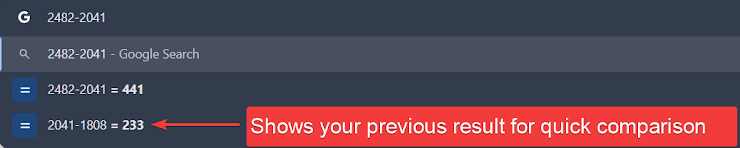
When you type math equations in the address bar, Chrome shows previous results for quick comparison
Chrome DevTools
Take a screenshot of the webpage
- F12 Open DevTools
- Ctrl+Shift+P to open command prompt
- Type screenshot
- Choose what type of screenshot you want
- Screenshot downloads to your folder
YouTube
Save video frame without overlays (no seek bar, no buttons)
- While watching any video on youtube.com, pause it
- Use , and . (comma and period) to seek to the precise frame you want to save
- Right-click twice in the video (the second menu has "Save video frame as")
- It saves using the current streaming resolution selected in the Settings icon in the bottom-right of the video regardless of your browser size
- If you want a higher resolution, manually choose it in Settings, then repeat these steps
- This doesn't work on embedded videos because the right-click menu refers to the iframe container, not the video itself; Solution: Click the video title to open the embedded video on YouTube then follow these steps
Source gemini.google.com/share/27ca2080facc
Sublime text editor
Select in column mode
- Shift+Right-click drag with mouse
Insert in column mode
- Select rows
- Press Ctrl+Shift+L
- Press Home or End
- Paste or start typing
Source google.com/search?q=sublime+past+column+text
Useful symbols to copy-and-paste
❤️🫶 ★ 📹 🎄🧸🐻👍💪🙁🙂
Good morning ☀
Good morning 🌧🌧🌧 (when it is heavy rain)
Copyright ©
Temperature 10°C degrees Celsius
Math: π θ ≤ ≥
← → ◀ ▶ ⮜ ⮞
➤ Missing left-arrow http://xahlee.info/comp/unicode_arrows.html
➔ Missing left-arrow https://www.compart.com/en/unicode/search?q=Leftward
Create socials using "+" with one base email address
Don't create a new email address for each social
- social-media+totherescue-reddit@freedom.tm
- social-media+totherescue-instagram@freedom.tm
- social-media+totherescue-facebook@freedom.tm
- social-media+totherescue-x@freedom.tm
- social-media+totherescue-youtube@freedom.tm
- And so on
The "+" creates a unique email address that is all sent to social-media@freedom.tm (the "+" and everything after it is ignored)
Create all your socials before buying your domain
Don't use a 3rd party to search for socials
- Some will use bots to instantly register your name if you search for it and it is available
- Create your socials directly on each platform
- They will tell you if it is available during account creation
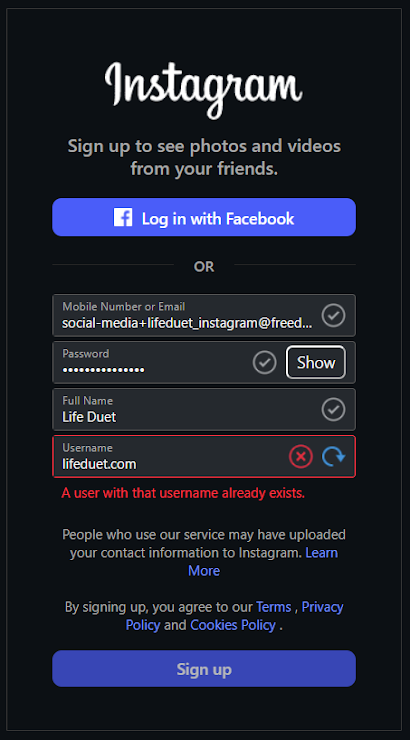
2026-01-12 I bought lifeduet.com and almost right away instagram.com/lifeduet.com was taken by a bot (it was available before buying the domain)
Translate PDFs with 1-click
translate.google.com/?sl=auto&tl=en&op=docs
Images
In Google Image search, right-click the big selected image, choose "Open image in new tab" to see the full standalone image
Upload movie or TV scenes to YouTube
Step 1: add .mkv in Resolve (video works, audio doesn't)
Step 2: use https://github.com/Gpower2/gMKVExtractGUI/releases to extract audio from .mkv as .eac3
- Or use https://mkvtoolnix.download/downloads.html#windows to extract audio from .mkv as .mka
Step 3: use https://sourceforge.net/projects/ffmpeg-batch/ to do sequential encoding of .eac3 or .mka to .mkv outputs in ./ffbatch which works in Resolve
Tools used to create scenes from high-quality source
- DaVinci Resolve 20 (imported .mkv video with no audio)
https://www.blackmagicdesign.com/products/davinciresolve
- Resolve doesn't see E-AC-3 audio, what's the easiest way to work around it?
You can use a tool like FFMPEG Batch converter to copy the video stream & re-encode the audio into any other codec such as AAC that DR supports, it's my go-to tool for it just know you will get a windows ""safety"" error when trying to install, this can be safely ignored
- reddit.com/r/davinciresolve/comments/1gij2gc/resolve_doesnt_see_eac3_audio_whats_the_easiest/
- forum.doom9.org/showthread.php?t=170249
- forum.blackmagicdesign.com/viewtopic.php?f=33&t=146187
- FFmpeg Batch AV Converter (export audio in a format DaVinci supports)
sourceforge.net/projects/ffmpeg-batch
- FFmpeg
ffmpeg.org/download.html#build-windows
Download gyan.dev/ffmpeg/builds
Copyright claim on YouTube
https://i.imgur.com/Es5KQNQ.png
- The copyright claim(s) on your video don’t affect your channel. This is not a copyright strike.
- There are no visibility restrictions.
- This claim doesn’t restrict your video at the moment.
- Claimants: Amazon Content Services LLC
- Details https://i.imgur.com/W9V5mo5.png
Other useful tools (not needed for this task)
- https://mediaarea.net/en/MediaInfo
MediaInfo is a convenient unified display of the most relevant technical and tag data for video and audio files
- https://blogs.sapib.ca/apps/mkvcleaver/
MKVCleaver is a front end (GUI) for MKVExtract.exe (from MKVToolNix) which extracts data from MKV files
- gMKVExtractGUI
https://forum.doom9.org/showthread.php?t=170249"
Show server latency in Pax Dei
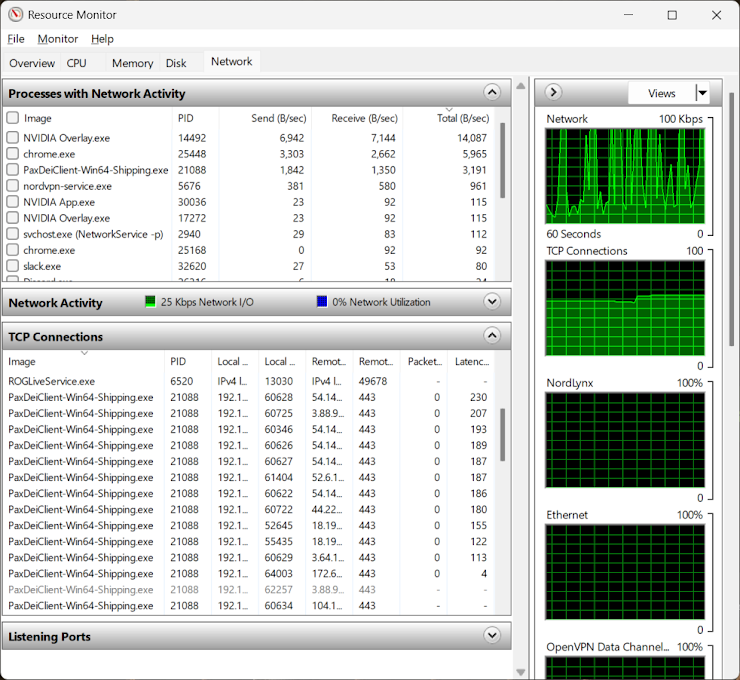
Run "resmon" in Windows (Win+R)
In "TCP Connections" scroll down to "PaxDeiClient" and observe "Latency" column
I get 230 typically as the highest of all the PaxDeiClient entries
Startup apps for all users
%ProgramData%\Microsoft\Windows\Start Menu\Programs\Startup
Startup apps for current user only
%userprofile%\AppData\Roaming\Microsoft\Windows\Start Menu\Programs\Startup" https://support.microsoft.com/en-us/windows/configure-startup-applications-in-windows-115a420a-0bff-4a6f-90e0-1934c844e473
Disable Windows key
To disable the Windows key on Razer keyboards like the Razer Huntsman, turn off Game mode by pressing Fn+F10. Enable the Windows key the same way.
Old .hlp files
To open .hlp files on the latest Windows, download stackoverflow.com/questions/43617504/how-to-convert-hlp-files-into-chm-files
Remove OBS Virtual Webcam
Running virtualcam-uninstall.bat as adminstrator at C:\Program Files\obs-studio\data\obs-plugins\win-dshow
Creator tips
8:15 Fan clips are safe, like phone clips from Formula 1 race
8:37 User-generated vlogs, X (Twitter), Reddit, Instagram safe to post
9:27 Diversify from many sources
2:45 What is fair use?
7:39 Sports and licensed videos are risky for copyright on YouTube
7:46 Bodycam footage is low risk content
7:56 Factual content like news or documentaries in an educational context are low risk
Best image file format
AV1 Image File Format (AVIF) is the current best image file format, 20% smaller than WebP
Improve page load time
1:09 Get to LCP (largest contentful paint) in less than 2.5 seconds
Job scams on Email, Telegram and WhatsApp
Beware of fake job listing scams using Telegram and WhatsApp. This is a new fraud trend that’s becoming more common.
How this scam works
- First, they'll post a job ad with high wages, flexible hours, rewards or passive income that seem too good to be true
- Then they ask you to add their 'Hiring Manager' on Telegram or WhatsApp to continue, so their messages can't be tracked
- Next, they may ask you to pay for equipment, software or training to help you get a head start
- They'll add you to a daily task group where you're asked to complete tasks for money
- Then they'll ask for your bank information, so they can credit your rewards instantly to your account
- They might offer small rewards to gain your trust. But then they'll ask for bigger payments to earn higher returns
- Afterwards, instead of earning extra money, you could end up losing your savings
What to look out for
It’s important to know the warning signs. You could be a victim of this type of fraud if the recruiter:
- Asks for copies of your passport and Emirates ID before you've met them in person or seen an official contract
- Doesn't want to interview you at their company offices
- Can't or won't explain what the job involves or why you’re a good candidate
- Has an empty or unverified profile with no photo, contact or employment details
What you should do
- Never share personal or financial information with recruiters or people you don't know, especially on messaging services
- Regularly check your bank account and card statements. If you notice any unusual transactions, report it to the bank.
- Always remember, NEVER share your bank log on details or one-time passcodes (OTPs) with any third party. No genuine business or organisation will ever ask for this information
Related
h.ki/best-in-class Best-in-class
tips.h.ki Tips site